
When you search for something on Google, which websites are you most likely to visit? Are they on the first page? The top of the first page? Do you ever click onward to the second page? If you’re like most people, you’re probably going to select a website from the top three search results. You will more likely try a new keyword before scrolling onto the next page.
Your search engine ranking matters because it’s how potential clients find you. Now more than ever, people check online first when researching a product or service. Search engine optimization, or SEO, is one way to set your business apart. Here’s how.
Getting started with search engine optimization: SEO basics
You want your website to look good on Google. Often, it’s the first (and only) impression a prospective client will have about your business. If they don’t like what they see—or worse, don’t see it at all—they will never click through to your website.
You can control what your search results look like.
A search result has two main components; the SEO Title and SEO Description. You have some control over what appears in the search result—and, you can use this to your advantage.
What is an SEO title?
An SEO title is the blue, clickable text seen (below) in search results. Generally speaking, it is the title of your webpage.
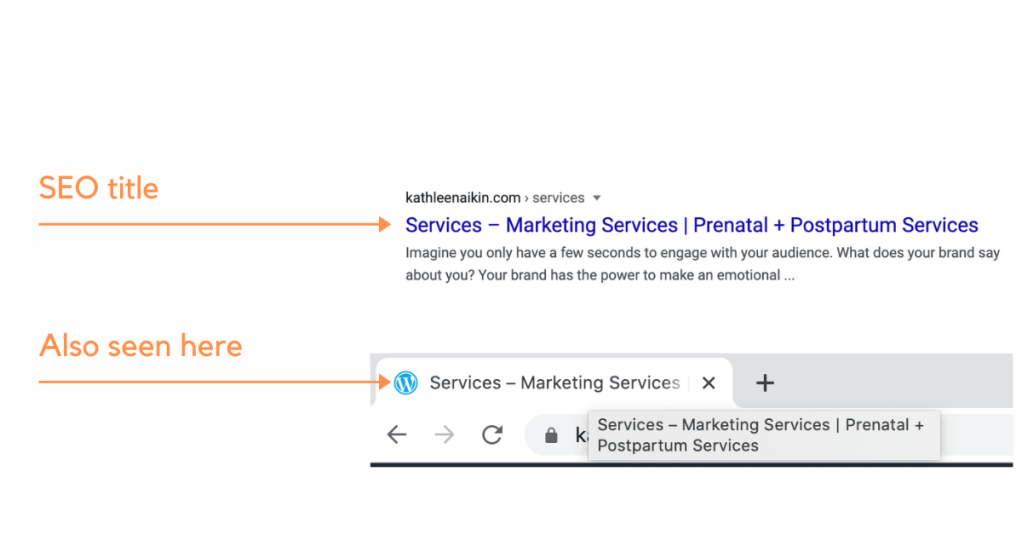
Your web editor platform (WordPress, Wix, etc.) should automatically generate your SEO title. It should be obvious where to enter the title in your web editor. As an example, in WordPress, it is simply the title of the page in the block editor.
Make sure the title is relevant to the content of the page. If it’s not, Google will down-rank your website.
It should be specific and descriptive. I had updated a website for a client a couple years ago who had just thrown some really vague descriptions into the page descriptions (think: “buy products online” and “product sales”). He didn’t realize it was showing up on Google as the SEO title!
I can’t think of the last time I’ve hard coded HTML for a website, but in the event you have a beautiful custom website, look for the <title> tag , located within the <head> tag toward the top of the page’s code:
<title> Your SEO Title Here </title>Regarding search engine optimization, you’d put your target keyword or key phrase for that page into the SEO title.
Tip: permalinks and slugs are different from SEO titles, but they still appear in search results. These are what you type into the web browser. Make them short and specific: for example /what-is-seo. This is a bonus place to put target keywords.
What is an SEO description?
The SEO description is the black text that shows underneath the SEO title. The most important thing to remember is that it can come from one of two sources: the meta description or on-page content.
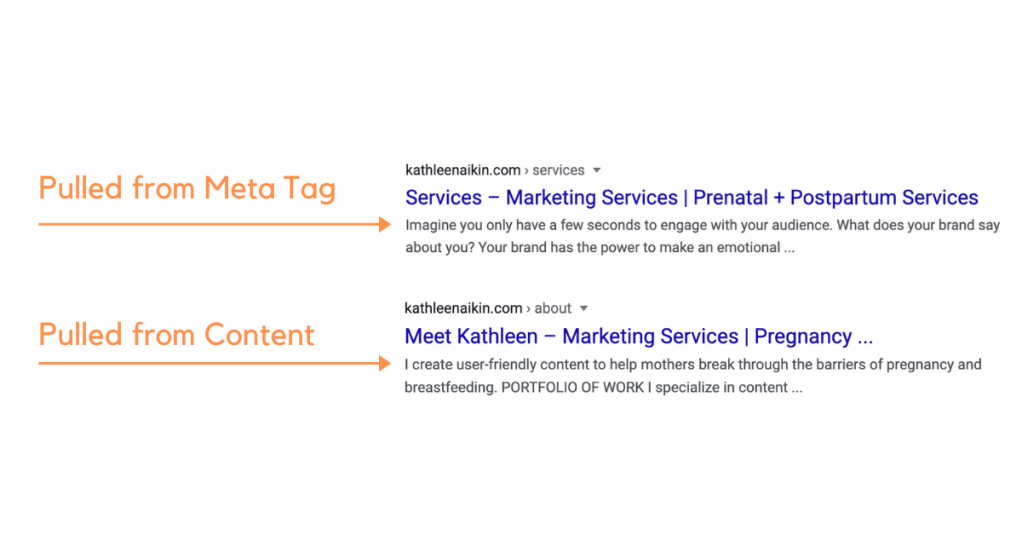
The meta description should be a short, specific description of the content on the page. This is where you’d put target keywords or key phrases.
Try to make your meta description 160 characters or less. There’s no hard cutoff on what will, or will not show on Google, but you can count on anything longer than 160 characters being replaced with ellipses.
Your web editor should have a place to put your meta description. On WordPress, you would put this in the Excerpt section under the Document tag in the Block Editor. On Wix it is in the advanced SEO section.
If you are not using a web builder, look for the meta description tag within the <head> tag of your HTML code. It should look something like this:
<meta name="description"
content="Your Meta Description Goes Here">
Google may also pull the SEO description from the on-page content. This tends to happen when numbered or bullet lists are relevant to the search term. Thus, with a nod to search engine optimization, make sure your on-site content is just as good as your meta description!
Keywords: what are they, and how do I select them?
Keywords and phrases are what people type into Google in search of a business like yours. As search algorithms evolve, there is a growing need for keywords to be specific and pointed. Web pages need to be highly specific, rather than broad. Here are a few examples of what your ideal client might be searching for online:
Where can I find a lactation consultant near me?
What is the best breast pump for twins?
Where can I buy extra parts for my breast pump?
How do I increase my milk supply?
When thinking about keywords, it’s important to think about your target market. What questions are they asking? What challenges are they facing? How can you help them? Create content around this, and include keywords and phrases organically into your content.
There are a few marketing tools out there to help you select keywords and phrases for your website.
The important thing to remember about selecting keywords is they need to be specific and relevant to your target market. In other words, answer the questions your customers are asking on Google.
Where do I put keywords?
There are several places to include keywords, including:
- In headings.
- Organically into the written content.
- In the slug or permalink.
- As the name of an image file.
- In image alt tags.
- In meta tags, including meta title tags, descriptions and keyword tags.
Tip When adding keywords into a webpage, the most important thing to remember is don’t be spammy.

5 Tips for choosing keywords
1. Be specific.
It’s very hard to market yourself as a generalist. Choose your niche market, and target keywords for them. For example, if you’re a doula focusing on hypnobirthing, make sure your website is ripe with content relevant to hypnobirthing topics.
2. Be relevant.
The online world has never been as competitive as it is today. Make sure the content you’re putting out there is relevant to your target market. This blog post is about SEO. However, since I work in the pregnancy and postpartum industry, I’m making sure the content is relevant to YOU, the reader.
3. Be genuinely helpful.
Your content needs to be genuine. Building a client list based on relationships is ideal, but it’s more than that. If your content appears overly spammy or sales-y, a reader is going to back out of that rather quickly. The average time a reader spends on your page is called the bounce rate. A bad bounce rate lowers your search engine ranking.
4. Avoid high volume keywords.
It’s very hard to rank highly with keywords that have tens of thousands of search queries each month. This is especially true if you’re just starting your business. Start by targeting pointed, specific keywords with volume ranging from about 400 – 1200 monthly hits. Consistently ranking well for moderate volume keywords will build your overall ranking, making it easier to break into higher volume keywords in the future.
5. Pay attention to trending content.
Did you hear about the woman who pumped a bottle of breastmilk during a marathon? Trending content means a temporary spike in web traffic around a specific topic. If someone is talking about your industry in the news, now is a good time to write an opinion piece on it. It’s time to jump on that train!
Local SEO matters
Even if you’re not competing globally, it’s still important to get your business on Google. It’s especially important if you’re operating in a local market.
Whenever a locality (e.g. “…near me,” “…near Denver,” “…in Seattle”) is attached to a search query in Google, a map will appear before organic search engine results.
For example, when I type doula near me into Google, this is the first thing I see:
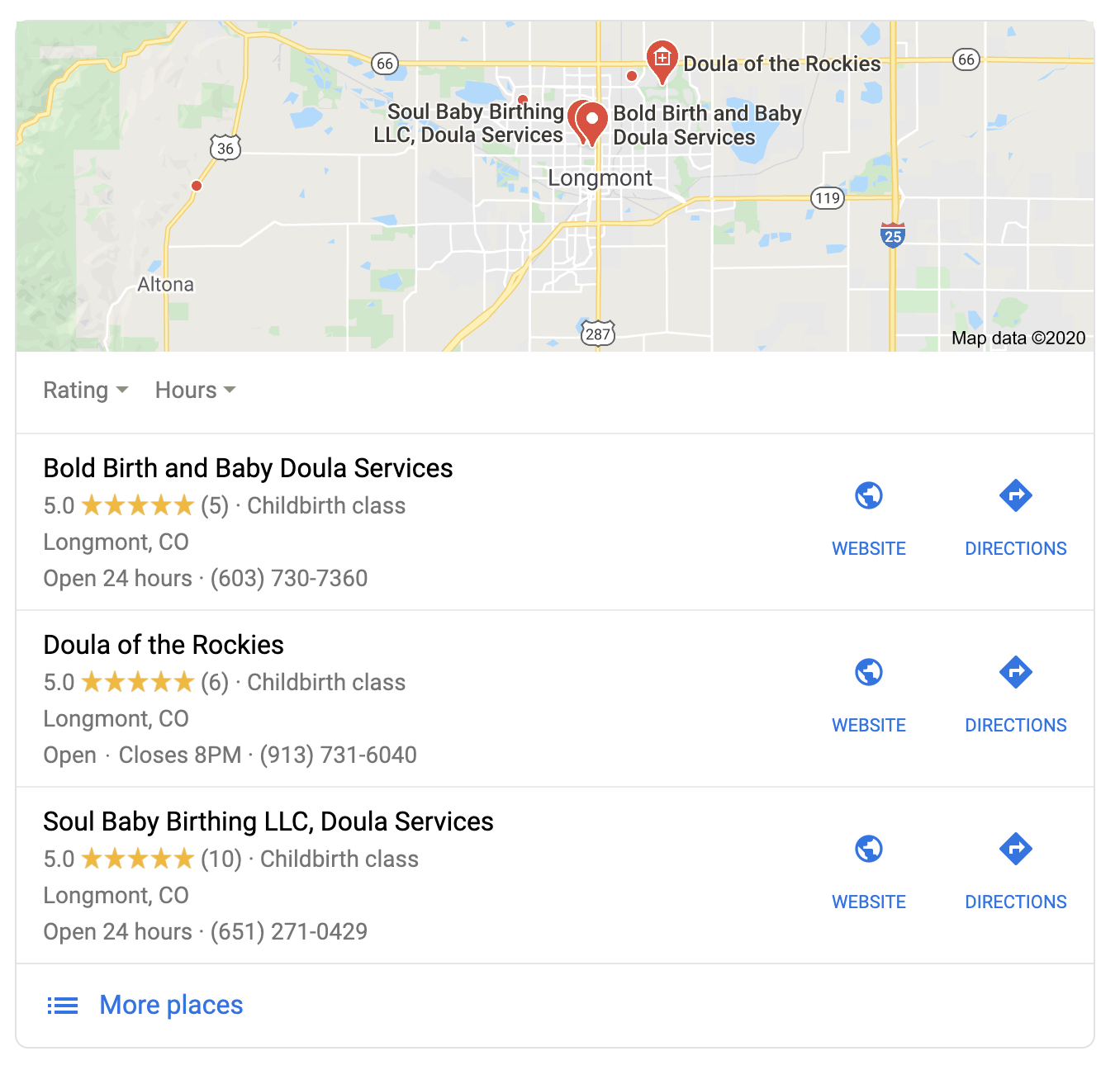
These are all doulas who have listed their business with Google. They also have the keywords “doula,” “doula services,” and “Longmont” (where I am sitting) within their web content (I checked).
Have you listed your business on Google maps? If you haven’t, I wouldn’t know about your business. I’d be more likely to click on one of these top results next to the map than scroll down to find another webpage that doesn’t appear on the map.
Do I need to hire an SEO expert?
Not necessarily.
I know, that seems nonsensical coming from someone who pays the bills with content marketing, but whether you need it really depends on how you’re getting your clients.
You don’t need to climb the Google mountain if you’re getting clients mainly from referrals, and you may not want or need to scale your business. That said, there are other areas content marketing can help you.
If you think you might need SEO, it’s best to hire content marketer.
Hiring someone will you time and money that you’d spend learning about content marketing and SEO strategy. A content marketer can help position your business as a trusted expert in your market. I can help by researching keywords and defining content that answers real questions asked on Google, by your customers.
 Marketing Services | Health & Wellness Brands